


PrestaShop Alert: Hacked via Ap Page Builder: anatomy of a real attack and how we shut it down

In this guide (7)
A PrestaShop vulnerability in the Ap Page Builder module allowed an attacker to execute code on a 1.7.7 e-commerce site we manage, write a webshell, forge a superadmin session, and try to disappear without leaving a trace. All in forty minutes, at night, from a network of rotating IP addresses.
In this article we explain how we reconstructed the attack from the logs, where the flaw was, why a previously applied patch hadn't closed it, and what we did to clean up the site. This isn't a translated advisory: it's the account of an incident we handled ourselves, written for those who manage PrestaShop stores and want to know what to look for in their own.
The signal wasn't a security alert, but a phone call from one of our clients complaining about some anomalies in the admin panel. A detail that seems trivial at first glance, if it weren't for the fact that PrestaShop, from the back office, doesn't allow certain actions to be performed.
That's where the analysis started. Looking at the access logs around those hours, the rest emerged: a systematic scan against a payment module and, a few hours later, the activity that led to the actual compromise.
The lesson we'll anticipate right away: a seemingly innocent functional symptom, orders disappearing, a cart behaving badly, a popup returning an error, can be the visible tip of an unauthorized access. It's worth investigating instead of dismissing it.
Anatomy of the attack
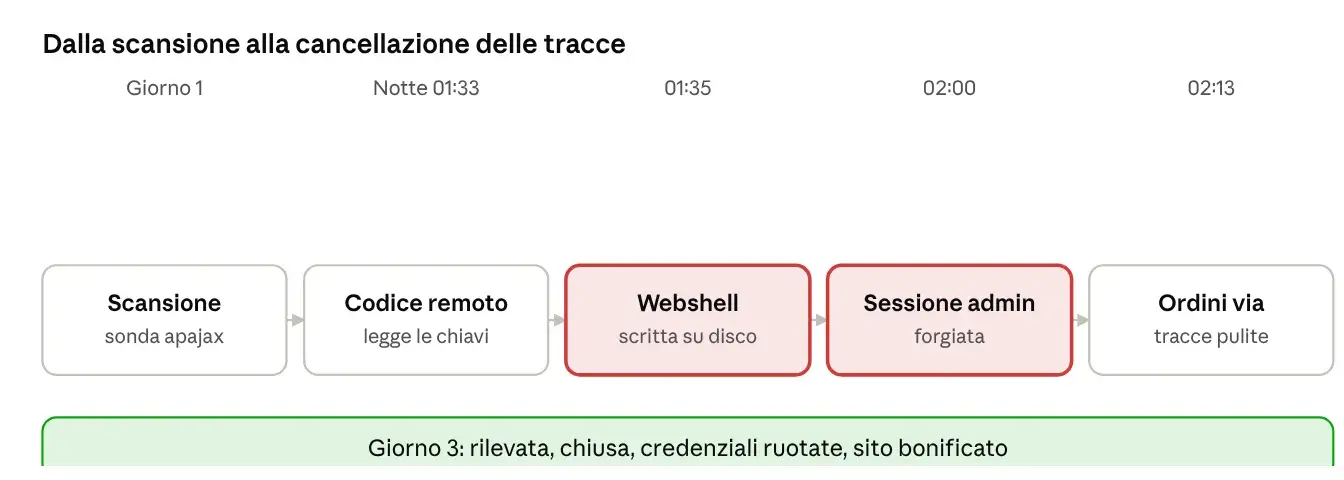
The whole chain, from the first code execution to the erasing of traces, lasted about forty minutes in the dead of night. Each request came from a different IP address belonging to a botnet, making blocking by origin useless.
The flaw: code execution in apajax.php
The entry point was apajax.php, a public endpoint of the Ap Page Builder module (sold by Leotheme/Apollotheme and extremely widespread in PrestaShop themes based on Leo). The endpoint accepts a "shortcode" that the module processes through the Smarty template engine. The problem is that, in the presence of a generator-type shortcode, the content passed from outside is interpreted as a template: a classic Server-Side Template Injection that degenerates into PHP code execution.
In practice, whoever sends the request chooses which PHP function to have the server execute. The attacker first tested the ground with harmless operations, then moved on to reading configuration files and finally writing a file to disk. No authentication was required: the endpoint responds to anyone.
The same module has other known flaws documented over the years: an SQL injection via apajax.php (parameters like product_all_one_img) and a path traversal (CVE-2024-6648) that allows including system files. In our case, the exploited route was template injection, the most powerful of the three because it leads directly to code execution.
With code execution in hand, the attacker read the application's parameters file and from that moment had the keys to the house
A first fix that wasn't enough
On this site there was already a patch for the same endpoint: a filter that rejects the request if it contains certain dangerous words (system, exec, shell_exec, eval and similar). It's the instinctive approach, and it's also the one that didn't hold up. It's worth explaining why, because it's a mistake that repeats itself everywhere.
A "blacklist" of words fails for three reasons:
The filter acts on the raw value, but the code decodes it afterwards. Further along in the flow there's a urlencode. Just encode a forbidden word twice so that it passes the static check and becomes readable again an instant later, just in time to be executed.
Functions are always missing. The attacker didn't use system, as happens in more frequent attacks, but the friendly file_get_contents to read the configuration and mysqli_connect to happily query the database.
The module has its own encodings. It uses internal placeholders that it converts into quotes and parentheses after the filter check. Another way to hide the text from the blacklist.
With our intervention we blocked outright the parameters that trigger the shortcode, after verifying in the logs that the theme's legitimate traffic never uses them. It's a solid patch because it doesn't try to distinguish good code from bad: it blocks the channel. The definitive solution is to sign the shortcodes generated by the server and reject anything that arrives without a valid signature, or to update or replace the module.
How we closed and cleaned up
Handling an incident follows a precise order, and getting it wrong makes things worse. The first temptation, deleting the webshell as soon as it's found, is also the most common mistake: you destroy the evidence of how they got in and you don't know what else they left behind.
First: freeze the evidence. Copy the logs and dump the database before touching anything. Logs rotate, and without a copy you lose the history on which the whole analysis is based.
Then: understand before cleaning. We reconstructed every command executed by the attacker from the logs. Only at that point did we know what they had read (configuration, tables, cookie keys), what they had written (the webshell, a temporary entry in the admin's password file) and what they had deleted (their own forged sessions).
Containment. We closed the entry point by blocking the vulnerable endpoint's parameters, verified that the block returned 403 and didn't break legitimate traffic, and moved the webshell out of the document root while keeping a copy.
Escalation check. An attacker with code execution as the site's user can try to escalate to root. We checked processes, system users, SSH keys, cron jobs, outgoing network connections and modified system files. No evidence of compromise at the server level: the damage remained confined to the site and its database.
Credential rotation, all at once. This is the point that allows no shortcuts. With code execution the attacker read the database credentials and the cookie keys. They must be changed all at once: database password, cookie signing keys, passwords of all back office accounts, invalidation of active sessions (stolen tokens remain valid until you do this), FTP and panel credentials, API keys of the payment modules. Changing them one at a time while a backdoor is still active is pointless: the new credential gets read again a minute later.
Restoration. The cleanest approach for a compromise at this level is to rebuild the files from a backup predating the attack, not to clean up the current ones: on a breached site you can never be sure you've found everything. The database, on the other hand, is not restored from backup, because you would lose the legitimate orders received in the meantime; it is cleaned up in a targeted way.
Checklist for those using PrestaShop 1.7 with the Leo or Apollo theme
If you manage a PrestaShop store with a theme based on Leo/Apollo and the Ap Page Builder module, here's what to check today.
Check whether apajax is reachable and whether submitting a shortcode produces abnormal output. If the theme doesn't use dynamic shortcodes on the front-end, block the parameters that trigger them.
Update or remove Ap Page Builder. Outdated versions of the module are the problem; if it can't be updated, isolate the endpoint at the web server level.
Look for recent or anomalous PHP files inside modules/, especially ones with names that look innocuous (health check, cache, ajax). Compare by inode change date, not just modification date: the latter can be falsified.
Check ps_checkout versions below 5.3.0 have a public flaw (GHSA-MQQ7-WXX5-MP8H). Update it.
Verify the integrity of the admin area password file and that upstream protection (IP or HTTP password) is active.
Don't keep credentials or keys in files readable by the site's user any longer than necessary, and keep a private SSH key outside the document root.
Enable extended logging and keep the logs long enough to be able to reconstruct an incident after the fact.
Put an application filter in front of the site that recognizes attacks on cart, checkout and module endpoints, since the attacks come from botnets with rotating IPs and blocking by address is useless.
What we take away from this
Three things, beyond the single module.
Third-party software is the real perimeter. The PrestaShop core has nothing to do with it: the flaw was in a theme module, as is the case with most PrestaShop compromises we see. Every installed module is code that runs with the site's privileges, and must be treated as such: updated, verified, removed if unnecessary.
A wrong patch is worse than no patch, because it gives a false sense of security. The filter blocking a sequence of "keywords" had been in place for months and had convinced whoever put it there that the problem was closed. It wasn't, and this left the door open longer. When you fix a flaw, fix the channel, not the symptoms.
Response speed matters more than perfect defense. No site is unbreakable. What makes the difference is noticing it, reading the logs, reconstructing what happened and closing things in the right order. In this incident the time between the report and the closing of the entry point was short precisely because there were logs to read and a method for doing so.
There remains a duty toward those who suffer a data access: when an attacker reads customers' personal data, there's a legal assessment to be made, which is up to the data controller together with their consultant. The technical provider communicates it without delay and in writing.
Outdated PrestaShop platforms are the starting point
The real problem is this: updating even when the cost is high. CMS-based platforms customized over the years are rarely updated precisely because of the custom code. Time passes and vulnerabilities grow, especially in times when AI can find bugs on operating systems and distros (Linux) once considered secure, let alone open source platforms that, to meet clients' specific needs, are enriched with countless third-party modules.
This is where KEIDEACMS was born: secure, proprietary and without additional plugins
The idea of creating our own universal CMS stems precisely from the fact that the most renowned open source CMSs, in order to become universal, sacrifice a great deal of their security. On the other hand, they have the extreme convenience of adapting excellently to various types of businesses... but at what cost? A data loss today translates into thousands of euros in fines if not handled properly. Are you willing to take such a big risk?
If I were the owner of a business wanting to create something online, I'd make a call... no obligation... try KEIDEACMS, you won't regret it.